 Written by
 Introduction
In the vibrant worlds of fashion and promotional products, embroidery adds a touch of elegance and professionalism that sets brands apart. Whether you’re designing a chic embroidered dress or creating branded caps for a marketing campaign, turning your vision into a stitch-ready design is key. This process, known as digitizing, transforms digital images into files that embroidery machines can read, ensuring your designs look sharp on fabric. In this guide, we’ll explore how to use custom embroidery digitizing to create stunning fashion pieces and promotional items, offering practical methods and tips for success.
What Is Custom Embroidery Digitizing?
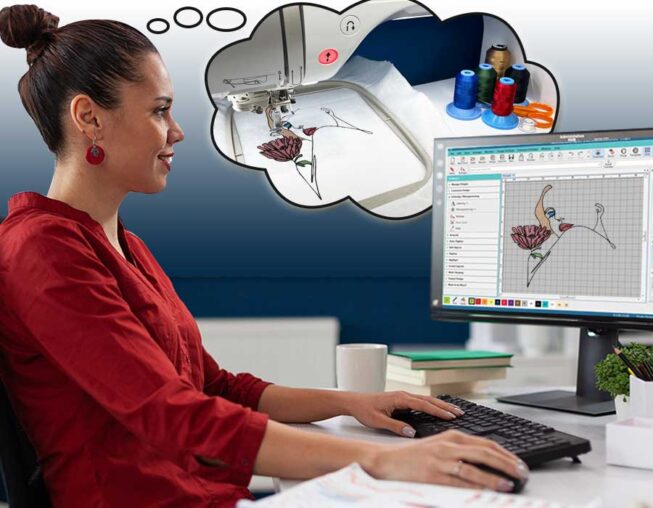
Custom embroidery digitizing converts digital images, like JPGs or PNGs, into machine-readable files (e.g., DST, PES, EXP) that guide embroidery machines to create stitch patterns. Skilled digitizers or specialized software analyze the image’s shapes, colors, and details, assigning stitch types and thread colors to produce a design optimized for specific fabrics and machines. Unlike automated tools, custom digitizing tailors the file to your exact needs, ensuring high-quality results for fashion garments or promotional products.
Why Custom Digitizing Matters for Fashion and Promotional Products
Embroidered designs elevate fashion and promotional items by adding durability, texture, and a premium feel. In fashion, custom embroidery creates unique patterns or logos that enhance brand identity on dresses, jackets, or accessories. For promotional products, embroidered logos on items like hats, bags, or shirts serve as lasting advertisements. Custom digitizing ensures these designs stitch cleanly, maintaining clarity and vibrancy, which helps brands stand out in competitive markets.
Methods for Custom Embroidery Digitizing
Several methods make custom embroidery digitizing accessible for fashion and promotional projects. Here are the top approaches:
Method 1: Use Embroidery Software for Digitizing
Embroidery software provides a reliable way to digitize designs, offering control over the process. Two beginner-friendly options are:
- Embrilliance Essentials: An affordable, user-friendly program that supports multiple file formats and includes auto-digitizing tools.
- SewArt: A budget-friendly software ideal for digitizing images into embroidery files with simple features.
Steps to Digitize with Software
- Install Software: Download Embrilliance Essentials or SewArt and install it on your computer. Both offer free trials.
- Import the Image: Open the software and load your design (JPG or PNG). Set the size to match your embroidery hoop.
- Auto-Digitize: Use the auto-digitizing tool to trace the image’s shapes and colors, creating a stitch pattern.
- Simplify the Design: Reduce colors (aim for 6–12) and remove fine details or gradients that don’t translate well to embroidery.
- Adjust Settings: Tweak stitch density, underlay, and stitch types (satin for outlines, fill for solid areas) to suit your fabric, like silk for fashion or cotton for promotional items.
- Save the File: Export the file in your machine’s format (e.g., DST for Brother, PES for Babylock) and test it on scrap fabric.
These programs make digitizing straightforward and produce high-quality results.
Method 2: Use Free Tools Like Ink/Stitch
For a cost-free option, Ink/Stitch, a plugin for the free vector graphics editor Inkscape, can digitize designs with impressive results.
Steps to Digitize with Ink/Stitch
- Install Inkscape and Ink/Stitch: Download Inkscape from its official website and add the Ink/Stitch plugin.
- Import the Image: Open Inkscape and import your design. Use the “Trace Bitmap” tool to convert it to a vector format.
- Digitize the Design: Use Ink/Stitch to assign stitch types and colors, optimizing for fashion fabrics or promotional items.
- Preview and Adjust: Check the stitch preview to ensure the design looks clean. Adjust settings like stitch density if needed.
- Export the File: Go to “Extensions” > “Ink/Stitch” > “Embroider” and select your machine’s format.
- Test the File: Transfer the file to your machine via USB and stitch it on scrap fabric.
Ink/Stitch requires some learning but offers a powerful, free solution.
Method 3: Hire Professional Digitizing Services
If you prefer a hands-off approach, professional digitizing services can convert your designs into embroidery files quickly and accurately. Platforms like MySewnet or Etsy sellers are great options.
Steps to Use a Professional Service
- Choose a Reputable Service: Select a provider with positive reviews and a strong portfolio, such as MySewnet or an Etsy digitizer.
- Upload Your Design: Submit your JPG or PNG and specify your machine’s file format.
- Provide Details: Indicate your machine type, hoop size, fabric (e.g., denim for fashion, canvas for bags), and color preferences.
- Receive the File: The service will email the digitized file, typically within 24–48 hours.
- Test Before Stitching: Stitch the file on scrap fabric to verify quality and compatibility.
Professional services are ideal for complex designs or businesses seeking top-tier results.
Benefits of Custom Embroidery Digitizing
Custom digitizing offers several advantages for fashion and promotional products:
- Premium Quality: Professional digitizing ensures clean, vibrant designs that enhance the perceived value of garments or items.
- Brand Consistency: Digitizers match thread colors to your brand’s palette, ensuring uniformity across products.
- Versatility: Designs can be tailored for various fabrics, from delicate fashion materials to durable promotional items.
- Time Savings: Outsourcing or using efficient software frees up time for design and production.
- Cost Efficiency: Affordable services or software eliminate the need for expensive in-house digitizing.
These benefits make custom digitizing a must for creating standout products.
Tips for Successful Custom Digitizing
To achieve professional results, follow these tips:
- Use High-Resolution Images: Start with designs of at least 300 DPI to capture details and avoid pixelated stitches.
- Simplify Complex Designs: Reduce colors and remove tiny details that don’t translate well to embroidery.
- Match Thread Colors: Use thread color charts (e.g., Madeira, Isacord) to align with your brand’s colors.
- Test on Scrap Fabric: Always stitch a test piece to check for issues like puckering or thread breaks.
- Specify Fabric Type: Inform your digitizer or software about the material (e.g., silk, canvas) to optimize settings.
These practices ensure clean, consistent designs for fashion and promotional use.
Common Challenges and Solutions
Digitizing can present challenges, but they’re manageable:
- Complex Designs: Intricate patterns or logos with gradients can be tricky. Simplify the design before digitizing or consult a professional.
- File Compatibility: Ensure the file format matches your machine’s requirements to avoid stitching issues.
- Fabric Variability: Different materials need specific settings. Adjust density or underlay for delicate or thick fabrics.
- Color Matching: Thread colors may not perfectly match digital colors. Use color charts for accuracy.
Testing files and working with experienced digitizers help overcome these hurdles.
Tools to Enhance Your Workflow
Streamline your digitizing process with these tools:
- Photo Editing Software: Use GIMP, Canva, or Photoshop to simplify and enhance designs before digitizing.
- USB Transfer: Use a compatible USB stick to transfer files to your embroidery machine.
- Stabilizers: Choose cut-away for stretchy fabrics, tear-away for woven materials, or wash-away for delicate fashion items.
- Online Tutorials: Watch YouTube videos or join forums like Reddit’s r/Embroidery for digitizing tips.
These tools make the process smoother and improve file quality.
When to Outsource Digitizing
If your design is complex or you’re short on time, outsourcing to a professional digitizing service is a smart choice. These services deliver high-quality files tailored to your machine and fabric, often faster than manual digitizing. Look for providers with strong portfolios, confirm they support your file format, and read reviews for reliability. Outsourcing is perfect for intricate fashion designs or bulk promotional orders.
Conclusion
Custom embroidery digitizing is a powerful way to create stunning fashion garments and promotional products that elevate your brand. Whether you use software like Embrilliance or SewArt, free tools like Ink/Stitch, or professional services, digitizing ensures your designs look sharp and professional. Start with high-quality images, simplify designs, and test files to achieve flawless results. With these methods, you’ll create embroidered products that stand out in fashion and marketing. Dive into custom embroidery digitizing today and watch your designs come to life with style and precision.


 Written by
  Written by